
Introduction
This guide will explore the intersection of teaching and design, based on Richard Mayer’s Principles of Multimedia Learning. By considering how information is shared, through visual and/or verbal modalities, it helps you create and deliver presentations that are accessible to all.
Here is a brief summary of the principles that will be discussed:
- Keep it simple by removing extraneous content (Coherence Principle)
- Highlight important cues to give students something to focus on (Signaling Principle)
- Show and tell by using words and graphics together rather than words alone (Multimedia Principle)
- Avoid duplication by focusing on graphics and narration rather than including text as well (Redundancy Principle)
Learning Outcome
By the end of this guide, you will be able to:
- Identify multimedia principles that help reduce mental processing effort and improve comprehension of PowerPoint slides.
Keep it Simple
“Adding extra material can hurt learning”
(Clark & Mayer, 2016, p. 151).
According to Mayer’s Coherence Principle, people learn better when you exclude unnecessary material. Everything on your slide (ie. images, text, narration) should directly support the learning goals.
Good practices to integrate into your slide design are:
- Review your slides and notes critically to reduce, simplify, and clarify
- Include only simple images and text that relate to learning goals
- Remove decorative or “fluff” material that distracts from learning (unless there is strong purpose behind its use)
In the example below, the slide contains a number of elements which may distract from learning because it is not clear where to focus or what the overall message is. Then, as you’re narrating the slide, the learner is left trying to figure out how all the slide elements relate to the overall message you’re sharing verbally.
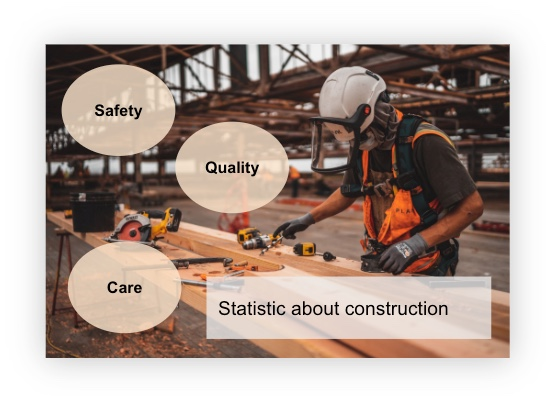
Instead, by reducing, simplifying, and clarifying the message, the revised slide now contains only the relevant elements that support learning. This way, the image and statistic can be used to pique learner interest and you can share the message about safety, quality, and care verbally. Now, the learner is able to relate the slide elements with the message being shared verbally more efficiently as there is less to focus on and figure out.

Ask yourself
Do my slide elements help learners comprehend the material (DeBell, 2019)? Do my slide elements enhance learning or distract from it? Can I simplify my message about this slide by trimming words (DeBell, 2019)?
Highlight Important Cues
“People learn better when cues that highlight the organization of the essential material are added”
(Clark & Mayer, 2016, p. 108)
According to Mayer’s Signaling Principle, learners benefit from knowing what information matters, especially when slides contain multiple elements. Add cues (e.g. circles, highlights, or arrows) to direct attention to the important information on the slide:
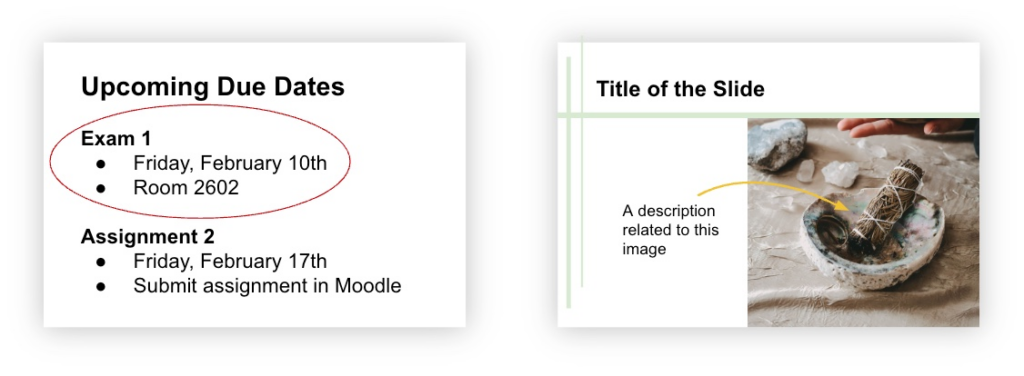
However, use cues only when necessary. Overusing them reduces their effectiveness.
Structure Information with Advance Organizers
Another way to focus attention on important information is using advance organizers (opens in a new tab). Advance organizers are used to structure your slides to help learners connect what they already know with what they’re about to learn. Integrating them in your slides provides learners with a framework that shows how your information is organized, making it easier for students to follow along during your presentation.
Click the left/right arrows in the following slides for examples of how advance organizers can help you transition between sections in your presentation:
Ask yourself
How might I be able to use an advance organizer in my slides?
Show & Tell
“Include both words and graphics”
(Clark & Mayer, 2016, p. 70)
According to Mayer’s Multimedia Principle, people learn better when you present both words and pictures together, rather than words alone. This combination encourages active processing as students mentally represent material in both words and pictures and make connections between them. Using only text may reduce comprehension, especially for students with less background knowledge, because they may struggle to connect just words with other knowledge (Clark & Mayer, 2016, p. 71).
For example, the slide below includes only text which may make it difficult for learners to process and know what equipment to gather.
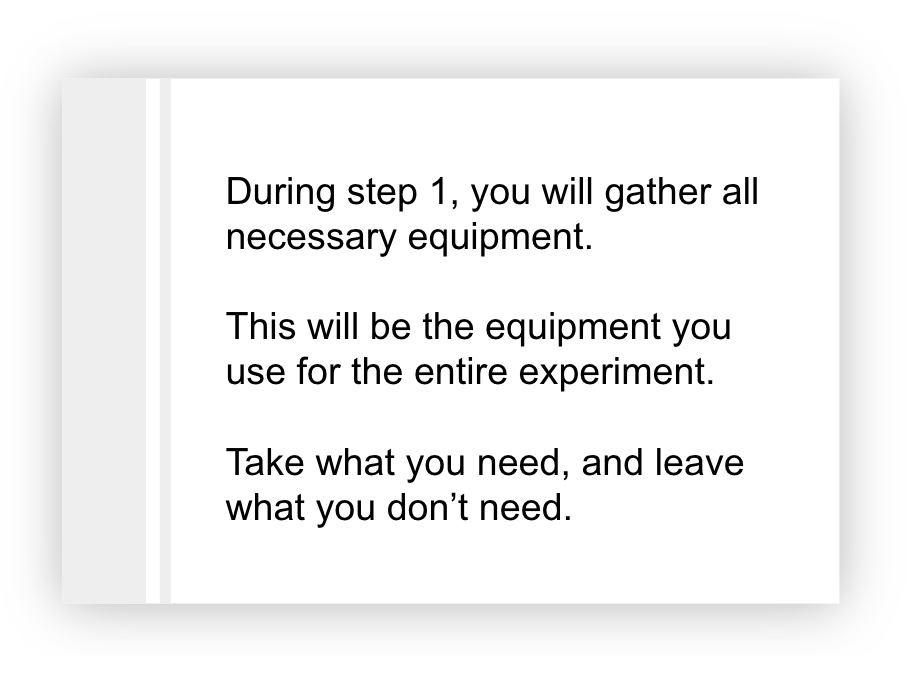
In the next example, the text has been reduced to include only relevant information and an image was chosen to illustrate what needs to be gathered. This helps the learner associate the equipment that needs to be gathered with the graphic of the equipment.

Now, you might be wondering, what happens when we consider the idea of combining printed words, pictures, and spoken words, like we do in our presentations? The next section will explain this further.
Avoid Duplication
“Explain visuals with words in audio or text but not both”
(Clark & Mayer, 2016, p. 131)
According to Mayer’s Redundancy Principle, when presenting material on a slide, people learn better from graphics and narration rather than from graphics, narration, and on-screen text. Avoid adding text to graphics you’re narrating (Clark & Mayer, 2016, p. 131). This prevents overloading our brain with information it needs to process.
For example, play the video below to hear how a student may process this slide design while listening to their instructor narrate it.
Now, play the next video to hear how a student may process the new slide design below. Since learners can only focus on limited things at one time, it’s important to consider how this impacts the learning experience.
Using Text Purposefully
You may find that text-based information on your slides help many learners, including English language learners. However, presenting text while talking about it isn’t the most effective approach since it becomes redundant. Consider these alternatives:
Provide brief lecture notes before or after class
Create guided notes with prompts students fill in during class
Share slide versions with detailed text in the notes section for review
This allows learners to focus on listening to you rather than trying to read, listen, and take notes simultaneously which is cognitively draining.
Here’s a Tip
If slides do need substantial text, give learners time to read it before you elaborate verbally. This prevents them from trying to read and listen at the same time.
Conclusion
In the end, by using multimedia principles to design presentations, you can create slides that are both visually appealing and consider the whole learning experience. By strategically providing information through visual and verbal modalities, this helps reduce barriers to learning as it ensures key information is recognizable to all learners (CAST, 2018).
Connection to Competencies
The Designing Slides to Promote Learning guide aligns strongly with the B.C. Post-Secondary Digital Literacy Framework (opens in a new tab) by helping educators design presentation slides that are not only visually appealing but grounded in multimedia learning principles that support student comprehension. This guide primarily connects to the Creation and Curation competency, as participants learn to create accessible, well-structured slides that communicate information clearly and reduce cognitive load. It also relates to Ethical and Legal Considerations because accessible presentation design is a key component of equitable teaching that supports diverse learners’ needs. Finally, the module supports Digital Scholarship by strengthening instructors’ ability to use digital presentation tools intentionally to enhance teaching effectiveness and improve the overall learning experience. Together, these competencies support the intentional creation of inclusive presentation materials that enhance understanding and promote equitable access to learning.
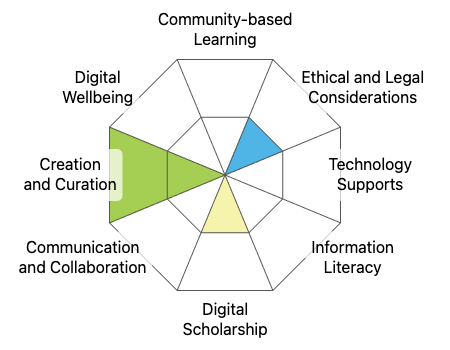
This graphic was created using the “Digital Literacy Framework Competency Stamp Generator” by Luke McKnight, Briana Fraser, and Katherine Cheung and is licensed under CC by 4.0
References
CAST (2018). Universal Design for Learning Guidelines version 2.2. Retrieved from http://udlguidelines.cast.org
Clark, R. C., & Mayer, R. E. (2016). e-Learning and the Science of Instruction: Proven Guidelines for Consumers and Designers of Multimedia Learning (4th ed.). John Wiley & Sons, Inc.
DeBell, A. (2019, December 11). How to use Mayer’s 12 Principles of Multimedia [Examples Included]. Water Bear Learning. https://waterbearlearning.com/mayers-principles-multimedia-learning/
Pictures Used
Photo by Jeriden Villegas on Unsplash
Photo by Christian Bowen on Unsplash
Photo by Content Pixie on Unsplash
Photo by Girl with red hat on
Unsplash