
Introduction
WordPress is a powerful tool for teaching and learning because it allows for much more flexibility than a tool like Moodle (TRU’s learning management system) for organizing your course materials. You aren’t constrained to the limited course formatting options in Moodle and you have much more flexibility over the visual components.
However, this also means that you need to design more mindfully to ensure you achieve an inclusive design. In this lesson, we’ll talk about how to do that.
Working in WordPress also allows you to open your course materials out to a wider audience, invite community participation in your courses, and allow your students to share their learning in the open. In this lesson, we’ll discuss the pedagogical benefits of doing this and how to explore learning in the open safely and mindfully.
In this module, you will also learn about the WordPress Resources at TRU, and how to get started building your own.
Learning Outcome
By the end of this guide, you will be able to:
- Implement WordPress in your TRU courses to support open learning and authentic assessment.
Course Sites
Offering students choice of knowledge input and output helps promote student engagement by allowing them to take information in and exhibit understanding of content in a way which is best suited to their strengths.
(Carette, 2017)
Why and How WordPress Can Be Used in a Course
Have you ever had the experience of feeling constrained by what your Learning Management System (LMS) offers, but still wanting to provide your students with the convenience of accessing course materials online? Or perhaps you have a great idea for students to create a professional website or work together on a blog, but there’s nothing in your LMS that really allows for that? Enter WordPress!
WordPress is a content management system that allows you a greater level of control and functionality over what you are used to in your LMS. It can seem overwhelming at first, but if you’re ready to explore a new tool it’s also a lot of fun! And indeed, much of the internet runs on WordPress, so you’re learning (or helping your students to learn!) a meaningful and transferable skill.
From an accessibility perspective, WordPress is responsive and, when used mindfully, can be a very accessible web experience for students. It’s especially useful for multimodal presentations of information: embedding audio, video, images, and H5P activities are all very straightforward. Indeed, instructors who use a lot of media in their courses often find that WordPress offers a more flexible and user-friendly choice.
Course Resource
An initial approach to using WordPress for teaching could be to set up a course website. This could replace your LMS site or, if you still wanted to use Gradebook functions in your LMS, could potentially work alongside it.
You can see how this could potentially work on our Beyond Moodle mock-up WordPress course site, or you can see how it actually worked in a course we did run on the site for our PIDP course (which we based on that template).
The benefits over an LMS is that you have more control over the look and feel of the site and you can share your teaching material with a wider community if you wish. Using plugins like Gravity Forms, you can even create simple dropboxes for assignments (though we don’t recommend this for large classes).
ePortfolios
A popular application of WordPress is ePortfolios, and there are lots of options available. For the purposes of this guide, we will look at a really simple example of an ePortfolio in use since 2020: the TESL Portfolio.
In this case, the instructor wanted students to have a place to post professional documentation, blog their reflections on their learning, and share information about themselves. The ePortfolio is both a classroom project and a public presentation for potential employers. This allows students a safe place to plan for how they would like to present themselves professionally, while still receiving feedback from their instructor.
SPLOTs
Sometimes, we have a good idea for a project that would be well-served by a website, but it’s not worth creating a major project for students or teaching them how to use WordPress. For that exact application, we have SPLOTs: lightweight, easy-to-use tools for allowing students to author on the open web with no accounts and very little necessary training.
You can check out more about SPLOTs here.
But it also helps to know what they can do by seeing them in action. SPLOTs can be used to collect submissions from participants within a class or around the world. For example, maybe you and a colleague at another university are teaching the same topic, and you want your students to blog about it to each other so they can see multiple perspectives. This template example works very well for easy blogging. Maybe you are teaching a course about public art and you want students to share photographs they have taken of public art? This template example is great for gallery development.
Spend some time looking at the other options, too, and seeing them in action!
Open pedagogies, authentic assessment, and choice
“Open pedagogy (OP) is an educational practice in which care, trust, and inclusion can be realized and through which students are intended to be thriving, collaborative learners creating knowledge together.”
(Maultsaid & Harrison (2023)
WordPress enables us to have students think and learn in the open, which can have both big benefits and big risks. Engaging with the larger community can help students see the value and utility in their learning, and it can help the stakes of an assignment feel real or meaningful.
It’s critically important to remember that when we engage in teaching and learning on the open web, we relinquish some control of the learning environment. In order to do this safely, always ensure the following:
- Students have the option to use a pseudonym, work anonymously, password protect their site, make it only available to you, or opt out of working online altogether. There may be many reasons why a student is trepidatious to put their name to work publicly online, and this must be respected.
- Discuss appropriate online behaviour with students and consider their work on the web for your class an extension of the classroom space as far as rules, conduct, and decorum are concerned.
Remember that choice is an empowering concept for students that they don’t always get much of. Allowing them to consent to being online (rather than demanding it!) is a much fairer approach.
Risks can include unexpected feedback from community members, including the risk of negative feedback that may be phrased in harmful ways. Marginalized learners are at greater risk of encountering hate speech online.
Despite these risks, though, opening up our classrooms to the world can have many benefits, and can be particularly inclusive of students who feel disadvantaged by essays and exams. Considering these teaching practices can help make your classroom a more inclusive place, as long as students are empowered to choose their level of exposure.
A Student Reflection on Open Pedagogy
Working in WordPress can enable us to take our learning experiences out of the classroom and into the world. In this essay, student Jaime Marsh reflects on what having opportunities to learn “in the open” meant to her.
Expand your learning
If you have time to explore this topic more, the entire Open at the Margins collection is really excellent. Read an article or two of interest to you from the table of contents to Open at the Margins.
Authentic Assessment
Because WordPress is a useful, transferable skill, and because learning in the open allows students to share their knowledge with others, many WordPress assignments align with the values of Authentic Assessment. This means that it is
- Realistic;
- Requires judgement and innovation;
- Requires the student “do” something;
- Replicates public accountability;
- Explores a range of skills; and
- Allows for practice, feedback, and revision (Wiggins 1998).
Authentic assessments should look and feel more like how we share knowledge out in the world than like a multiple choice exam or a fixed-topic essay. There should also be an element of choice so that students are exploring projects that they really care about. Authentic assessments can also benefit students who don’t feel they show their work best in traditional classroom assessment settings.
Using WordPress
The OpenETC community provides a shared infrastructure that allows you to sign up for your own WordPress site. With a WordPress website, you can support all kinds of applications: podcasting, blogging, professional sites, research dissemination, knowledge mobilization, data collection, conference registration, and more.
Screencasts
This video (2 minutes) is about the basic navigation of WordPress. This is only an introductory overview, but the WordPress support site is another great resource to explore.
This second video (2 minutes) shows you how to toggle privacy and security settings on your WordPress site.
This final video (2 minutes) offers a short introduction to using plugins to expand your site functionality.
Accessible WordPress
As with Learning Management System (LMS) and document design, choices you make when using WordPress strongly impact the accessibility of your website. Ensure you always attend to the following details:
- Give detailed alt-text for every image. This is the text that describes your images for users who use screenreaders. In general, you want to accurately describe the image, including any tone you hope it suggests. You also need to ensure any text within the image is accurately and clearly detailed, including detailed images like flowcharts.
- Describe your links in the linked text. Screenreaders can bounce from link to link, so when you just link the word “here” or “this,” it is nonsensical to those users. Make sure the linked text describes where the link is going to.
- Use headers to indicate headers so that screenreaders can orient themselves on the content.
- Watch the contrast between background and text colours. White on black is high contrast; light green on dark green is low contrast. Aim for high contrast to maximize legibility. You might also consider choosing a theme that allows users to toggle between light and dark mode at their preference.
For more information on creating accessible WordPress sites, please see the WordPress Accessibility site for additional good practices.
Conclusion
WordPress offers exciting possibilities for enriching your teaching practice, whether you’re looking for more design flexibility, wanting to help students build professional skills, or exploring open pedagogical approaches. While it may feel like a big step beyond your learning management system’s (Moodle) familiar interface, remember that you don’t have to tackle it alone.
Start small: maybe a simple course site, a SPLOT for a single assignment, or exploring the existing ePortfolio templates. As you get comfortable, you can expand your use of WordPress in ways that align with your teaching goals and your students’ needs. Just remember to always centre student choice and privacy when working in the open.
Connection to Competencies
The Using WordPress in Your Course guide supports the B.C. Post-Secondary Digital Literacy Framework (opens in a new tab) by building educators’ capacity to integrate flexible, web-based publishing tools into their teaching practice for authentic student engagement and public scholarship. This guide most directly aligns with the Creation and Curation competency since it helps instructors and students use digital publishing platforms to develop, organize, and share academic work in meaningful contexts. It also enhances Digital Scholarship by fostering understanding of how open web publishing supports critical thinking, audience awareness, and scholarly communication beyond the LMS. Finally, it touches on Technology Supports as participants develop confidence in selecting, configuring, and troubleshooting WordPress tools for educational purposes. Together, these competencies empower instructors to facilitate learning experiences where students create authentic digital work, engage with broader audiences, and develop skills in web-based communication and content management.
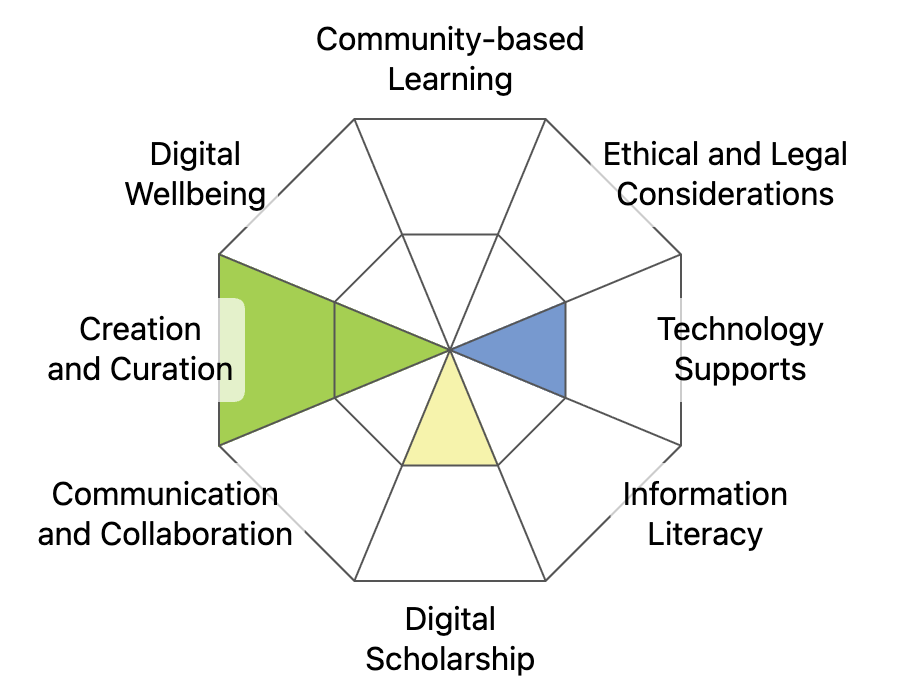
This graphic was created using the “Digital Literacy Framework Competency Stamp Generator” by Luke McKnight, Briana Fraser, and Katherine Cheung and is licensed under CC by 4.0
Module References
Carette, J. (2017, January 18). Blog: The choice IS THEIRS: Offering students choice as an inclusive teaching practice. Teaching and Learning Services. https://carleton.ca/tls/2017/blog-choice-offering-students-choice-inclusive-teaching-practice/
Maultsaid, D., & Harrison, M. (2023). Can Open Pedagogy Encourage Care? Student Perspectives . The International Review of Research in Open and Distributed Learning, 24(3), 77–98. https://doi.org/10.19173/irrodl.v24i3.6901
Wiggins, G. (1998). Educating assessment: Designing assessments to inform and improve student performance. San Francisco: Joey-Bass Publishers.